Access a vast library of vetted game modifications safely
CurseForge is a utilities app. It is designed for gamers who love to customize and enhance their games with user-created modifications. It immediately detects supported games such as Minecraft and World of Warcraft, or it lets you manually point it to the game folder if it doesn’t.
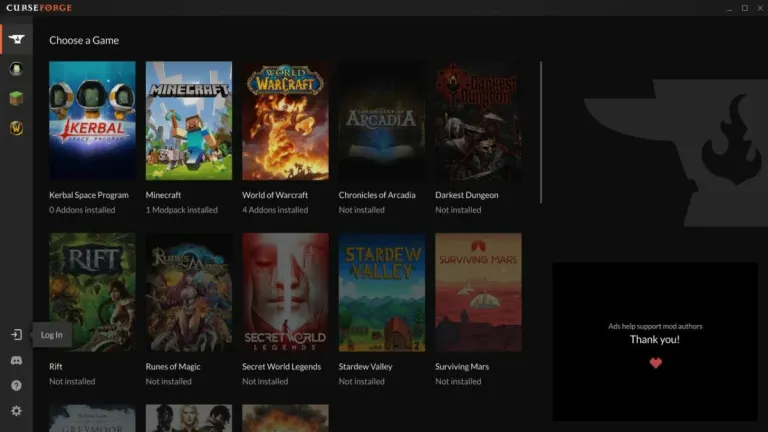
CurseForge’s main interface is clean and intuitive: you’ll see a list of featured modpacks, recently updated add-ons, and a search bar that filters results by tags, game version, and popularity. Thanks to its split between “Classic” and “Retail” sections, finding the correct type of add-on for your version is quick.
Browse and install mods
In CurseForge, other games follow similar categorization, although the bulk of the library is focused on Minecraft and WoW. Browsing the repository feels safe because every mod goes through a moderation process to check for malware or adware. When you pick a mod or modpack, details such as version history, required dependencies, and user ratings appear immediately. One-click installation brings everything down into the correct folder.
It even handles updates automatically in the background. If an installed add-on becomes outdated or corrupt, it flags it with a warning icon and offers to repair or reinstall it. This cleanliness reduces the guesswork often involved with manual mod management in other launchers. Uploading your own mod pack is similarly straightforward: click “Create Project,” give it a name, fill out a few fields, and upload your files.
The user experience is generally smooth, though you might occasionally encounter frequent update prompts in a single session. After Overwolf’s acquisition, the overlay and branding may feel cluttered initially, but its features, like multi-select for batch updates, device syncing, and management, are beneficial. Compared to other mod platforms, its stability and security are notable advantages that enhance the overall experience.
Create and share your own mod packs
CurseForge delivers a streamlined modding platform that feels secure and user-friendly. You browse a vast, curated repository of game modifications with clear categorization and one-click installation. Automatic updates and dependency management minimize manual effort, while warning icons keep you informed about outdated or corrupted add-ons. The intuitive interface and Overwolf integration allow you to manage mods across games effortlessly. You experience reliable, hassle-free mod discovery and installation.














.png)